One day, scattered context
Availability lives in one calendar, the organizer in another, and the customer record somewhere else.

Executive calendar operations
CalendarFuse gives executives and assistants one reliable place to see, clean up, and manage calendars across Google, Microsoft, Apple, and Salesforce.
Sample workspace. No sign-in or calendar access required.
The real problem
A CEO can have the same meeting in Outlook, Google Calendar, iCloud, and Salesforce, each with slightly different details. CalendarFuse is designed to recognize the relationship instead of creating another duplicate.
Availability lives in one calendar, the organizer in another, and the customer record somewhere else.
The assistant moves a meeting, but no one knows which copy is authoritative or which guests were notified.
Traditional mirroring can block time, but it rarely explains relationships, permissions, or CRM context.
Canonical events
CalendarFuse groups likely copies, preserves every source reference, and lets the assistant select the authoritative record before anything changes.
Thursday, September 10 · 10:00–11:00 AM
CanonicalTwo people, one operating rhythm
Set privacy rules, approve delegated access, and receive a clean daily view instead of juggling accounts.
See conflicts, source authority, CRM context, travel buffers, and permission boundaries before acting.
Inside the product
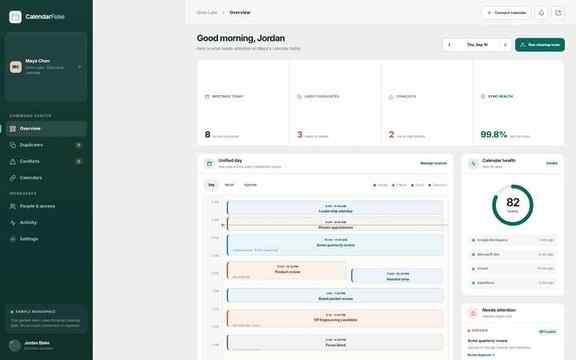
These are real captures from the interactive CalendarFuse sample workspace included in this build.
Guided product tour
The interactive tour chooses the most natural English voice available on your device, keeps captions on screen, and never sends narration text to CalendarFuse.
“CalendarFuse has already checked Maya’s four calendars and found the five issues that need Jordan’s attention.”
Security by design
The public demo contains only fictional sample data. Production connections are designed around provider authorization, least-privilege scopes, explicit assistant permissions, and a complete change history.
Connections use the provider’s OAuth or delegated-access flow instead of asking for calendar passwords.
Assistants can see availability while event titles, notes, and attendee details remain hidden.
Human and automated updates are recorded with actor, source, time, and affected event.
Private beta
CalendarFuse is being built for executive assistants, chiefs of staff, founders, and leadership teams managing calendar sprawl.
Questions
The site currently includes a complete interactive sample workspace and private-beta product experience. Live provider connections require production OAuth registrations and credentials before real calendar data can be accessed.
No. The product is designed as a control layer over the calendars an executive already uses. Original provider records remain linked, while CalendarFuse tracks which record is authoritative.
That is a core workflow. The executive can grant specific capabilities, including creating or moving meetings, resolving duplicates, managing connections, and seeing private details or only busy status.
Salesforce can provide context such as accounts, contacts, opportunities, and CRM-owned events. CalendarFuse is designed to show that context beside a meeting while respecting which system owns the actual record.
No. It uses the speech voices already available in the visitor’s browser or operating system. Captions are always present, and visitors can choose a captions-only tour.